
Anatomy of a Phishing Email I
It’s as if they knew I was starting a new blog today. This came into my personal email right after I published the previous post. It’s an impersonation pretending to be a family member.
I started making these kind of annotations for my current company. As a midstream construction company, we get a lot of workers out in the field who won’t bother with watching a video to learn how to recognize a malicious email. So I would take pictures of the email, annotate the clues, and send it to the recipients of the email. This became the start of our internal debriefing blog.
The Bait
In an impersonation, they’ve already done some homework on you. They know the name of a person who is a family member or an employer. Using MITRE ATT&CK, this means they’ve already gone through Reconaissance > Gather Victim Identity Information.
They’re hoping that you will react when you see the name. Reacting instead of thinking puts them in an advantage!
The Hook
They use the familiar name to get you to respond. By responding, particularly with work email systems, you establish that you have a business relationship with the other email address. Several email filters take “you sending to them” as a tacit, “I know this person”, which acts often as a personal “Permitted Senders” membership.
The Reel
This particular email aims to get more information from you – likely your login credentials. Before you think, “Please, there’s nothing in my email,” here’s why a cyber actor is interested in your email.
- They can trade on your reputation to target more people with phishing emails.
- They can look through your email for opportunities. Do you get your bank statements emailed to you? Your shopping receipts?
- They can target you for fraud attempts. By reading your email, they can get an idea of what you like to spend money on, or who you bank with. They can then tailor their account phishing attempts to appear from those places.
- They can try the same email address and password on more secure accounts, like your bank account.
The other popular goal of an impersonation is straight-up fraud. This is more often the impersonated boss who tells you to purchase gift cards “for the team” as a surprise, or to rush through an invoice for a new vendor.
The Catch
Blocking the address and deleting the email is always good. So is reporting it to your email provider or employer.
In many cases, the only information the actor has about the impersonated person is their name. Unless there is other reason to suspect a compromised account, such as an old email thread that suddenly receives a new reply, there’s often no need to tell the impersonatee that they were the role.
Anatomy of the Event
The Email
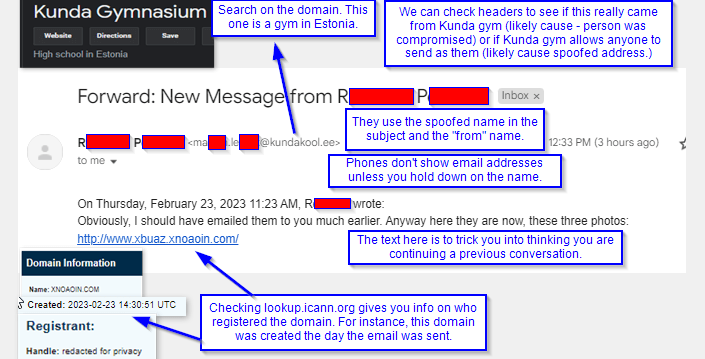
Here’s the clues that I noticed. As I acquire other samples that I can share, I’ll make this a series.
- Even though we’re family, we’re not close family. This is the first time that R.P. emailed me, I think, ever.
- The cyber actor cannot decide on the format. “New message from [Name]” is something you’d see in a work communications notice, like from a Microsoft Teams or such.
- The issue is, that has a format and this has none.
- The email text really fits better as an SMS text – which normally wouldn’t have a subject at all.
- The “from name” doesn’t match the name on the email. Looking at this on a computer, it’s obvious – but on a phone, all you’d see at first is that from display name. You’d have to click and hold (AKA longpress) over the display name to get the email address to pop up.
- Cyber actors like this because for personal email, you’re likely not using a filter service that will check against “matching contact names” to test for a possible impersonation.
- This also ties with the previous point in that some phones will merge emails and text messages together if you want. This reduces the number of “gathering points” you have to check. The cyber actor hopes you’ll see this email as if it were a text message.
- The email address is way out of the ordinary for email I usually get – it’s a gym in Estonia!
- I don’t have easy access to my headers on this email account. I’d look there next to be able to guess the source.
- If the email servers it used were Kundakool.ee ‘s, then it’s likely that M.L @ Kunda Gym previously clicked on a phishing email like this and entered their info. (A business email compromise) For work contacts, I’d reach out to them by other means so they can re-secure their account.
- If Kunda Gym doesn’t have a SPF, DMARC, or ARC set, I’d suspect that the bad guys noticed this and are spoofing the Kunda Gym domain. In this case, we’d have to block the sending server IP instead of the domain name. And reach out to the domain to encourage them to set a DMARC policy of at least “quarantine”.
- The email text wants you to think they are continuing a previous conversation. We like these connections. It’s a form of pretexting to trick you.
- The link email goes somewhere I’d never heard of. When I checked the domain against ICANN’s WHOIS register, I learned why – it was registered earlier today!


One response to “Impersonating the “From Display Name””
[…] steal your credit card and spend your money! Many of them use the same impersonation tactic as in Anatomy of a Phishing Email I where they change the “from display name”. This example uses that with the name […]
LikeLike