Anatomy of a Phishing Email II
This email is not looking to steal your account credentials – they want to steal your credit card and spend your money! Many of them use the same impersonation tactic as in Anatomy of a Phishing Email I where they change the “from display name”. This example uses that with the name “PayPal Support”.
The Bait
The cyber actor’s goal is to make you think that you’ve authorized a payment. This is to get you to react instead of think.
The Hook
They provide a toll-free number to call, wherein they will ask you to tell them your credit card number and CVV code to “cancel the pending transaction”. With certain scams, they may also want to create a remote computer session to “remove the unwanted software”.
They are LYING. No transactions have occurred. No software is on your PC.
The Reel
If you give them the card number and CVV, they can then make transactions as you. The CVV in particular is a “something you have” piece of multifactor authentication. Merchants ask for this to ensure you have the physical card. Anytime you give this to a merchant, you’re essentially allowing that merchant to make repeated transactions on your card.
If you allow them to run a remote session, they’ll likely INSTALL software – a keylogger or an agent for them to remote connect later – that will allow them to glean more information from your computer and the others around it.
The Catch
The best thing to do here is to block the sender and delete the email.
If in a work environment, reporting emails like this to the appropriate channels (a designated button or email address most likely. Ask your IT department on what the right method is.)
Anatomy of the Event
The Email
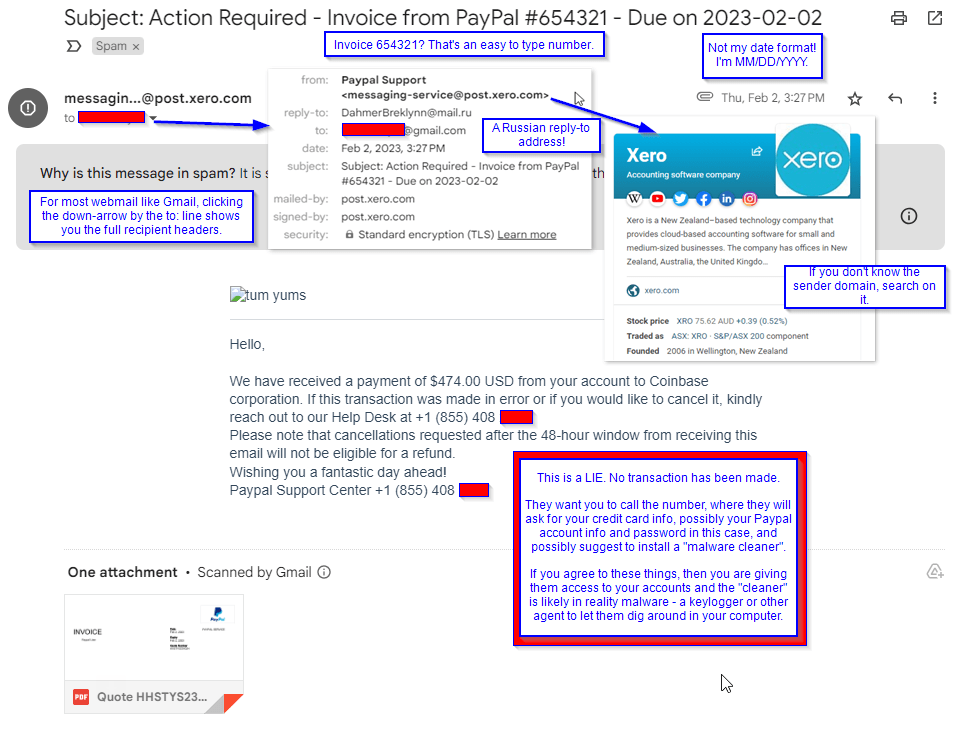
- The header – from and reply-to addresses.
Remember from last time that changing the “from display name” is primarily for phones which do not show both the display name and the email address. When opening emails in a webmail app, look for the way to show the full distribution header. For Gmail, shown her, a “v” (down caret) shows by your address. That allows you to see the full from name and address.
What you’re looking for is the last blah.blah of the address. This is the domain name, and you can search on it. Here, you’d expect PayPal Support to come from @paypal..com – but really, this came from a domain called Xero. This turns out to be a cloud accounting software; likely our cyber actor got into someone’s Xero account and is sending these emails from there.
Another thing that the block shows us is the existence of any separate “reply-to” address. This allows the cyber actor to direct the conversation into mailboxes they fully control, instead of a compromised account where they could lose access as soon as they’re discovered. This address aends in a 2-letter code, which is reserved for country codes. .RU is for Russia in our example.
2. The subject – Date format + Invoice number.
Cyber actors fail to think about their audience. An actor in Europe will think in their date format and time zone, not in yours, while the legitimate merchant like PayPal already knows your date and time format preferences.
The other part that stands out is the invoice number. It seems awful convenient that my invoice happens to be a 6-number straight!
3. Word choice within the text
Another huge red flag is the word “kindly”. Show of hands, how many Americans use this in your regular conversation? Maybe only when you’re making a point on the edge of violence, such as “Kindly take your hands off of me, before I hurt you.” More often, someone who learns English as a second language will use “kindly” where Americans use “please” as seen above. We’d say, “Please call the help desk” where they have “Kindly reach out to our Help Desk.” They also capitalized “help desk” where we wouldn’t.
A Potential Trap – An Attached File
Opening attachments is a bad idea when you’re not sure of the sender.
DO NOT TRY THIS AT HOME. TRAINED PROFESSIONAL.
A trend I’ve seen at work is a series of phishing emails that take the picture of a linked file (as depicted by Outlook), and using it as the “label” of a URL link. Thus it’s important always to hover over such an item and see if you get “File, file size” or “HTTPS / click to follow link”. .. And then submit the questionable email to your IT department to check out.
For this, I first determined that this was really an attached file and that it was a PDF. With this file type, there’s little to no chance of code that launches “on open”, but it’s still preferable to copy the file off to a “sandbox” (virtual device or separate hardware where you can turn off network connections) to prevent any code from calling out.
This particular PDF really was an invoice! Most likely made via that Xeno app. But take a look at it, because it’s also suspicious.
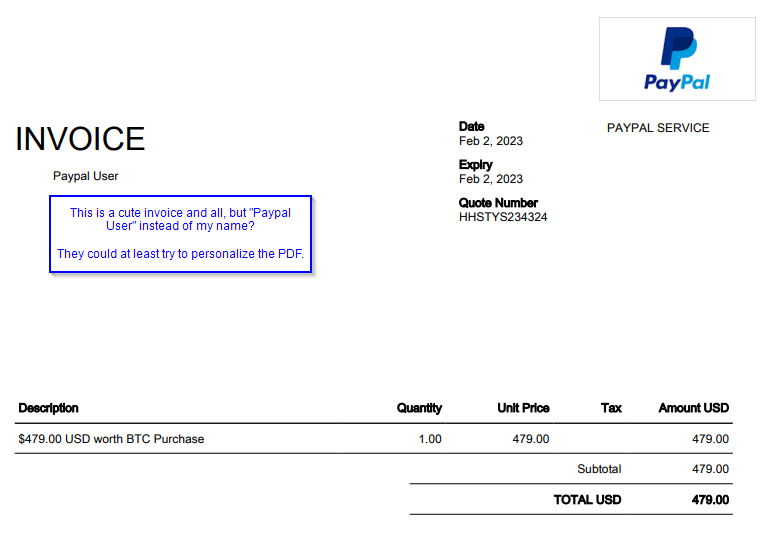
- No invoice #. Remember 654321? Nowhere on this.
- Addressed to “Paypal User” – no personalization. This lets them send the same file to many people!
- Failure to math. The amount was $474 in the email text, but $479 here. The cyber actor can’t keep up with their lie.
 Next On Stage: Off Phishing
You must be logged in to post a comment.