
Anatomy of a Phishing Email III
“I’m gonna bounce this call through nine different relay stations throughout the world and off two satellites.” – Whistler, “Sneakers”, 1992
This follows up on a special case of the credit card fraud type of attack. It also only took me three of these to realize I had the titles and subtitles backwards, and that I could extend the phishing / fishing analogy by setting up some blog headings.
For these and other phishing dissections, look for these parts:
- The Bait – What they’re using to trigger an emotional response from you. If they can make you REACT instead of THINK, they’re ahead in the con game.
- The Hook – The tactics employed in the event. I’ll map to MITRE ATT&CK mostly as self-practice. Please comment if you think a different mapping makes more sense!
- The Reel – The cyber actors’ likely goal and how they get it.
- The Catch – Now you know how to identify this, what do you do with it?
- Anatomy of the Attack – Going into detail of the email, website(s) involved, with annotated images.
The Bait
The bait in this variant is the same as in the larger credit card scams: an unauthorized, potential charge for your credit card or payment account.
The Hook
Here, the cyber actors stand up a new domain with email, often on a free or low-cost version of Office 365. They create two accounts.
They use one account to create a PayPal account, and the other account they seed with a distribution list as that mailbox’s “auto-forward” target.
They then create an invoice like the one below and send it to their second account, using the name “PayPal User”. The second account auto-forwards to the pre-seeded distribution list, in effect multiplying the invoices out to however many victims they’ve targeted.
That invoice is a real email from PayPal. The content of that email is fictitious, but the email itself is valid. In ATT&CK, this variant uses Resource Development > Acquire Infrastructure (register domain with O365 email) and Establish Accounts (PayPal), then Initial Access > Exploit Public-Facing Application (PayPal).
The redirect is a literal “pass the hash”, though we normally talk about password hashes. This is a DKIM hash, as shown in the anatomy below. Thus, Lateral Movement > Use Alternate Authentication Material > Pass the Hash.
The Reel
This particular variant has two ways for the cyber actor to get what they want.
- If you click the link, it takes you to Paypal where the hope you’d click through and accept the stated amount. This would be Execution > User Execution, Collection > Automated Collection, and Exfiltration > Transfer Data (money) to Cloud Account. Since you no longer have access to that money, they in effect have commited an Impact > Data Destruction on your side,
- They use an image of “PayPal Support” and a toll-free number in the hopes that you would want to “stop payment” on the charge.
The cyber actors then follow the larger playbook. to try to get your PayPal account info over the phone or by “cleaning” (installing) malware from (on) your system.
The Catch
At a minimum, delete the email and block the sender domain. That way, they have to spend some money on registering another domain to try to target you again.
A good proactive step would be to write phishing@paypal.com and include the original email as an attached file. Let them know this was an unsolicited request. I include some technical details when I forward these, such as point out how the email went first from PayPal to the cyber actor’s domain, then immediately to my email domain.
If you have about about 10 minutes to spare, also notify the FBI at their Internet Crime Complaint Center, www.ic3.gov . FBI Special Agents at industry shows have confirmed that even if no money changed hands, even if you have little information on who the attacker really is, submit a report and list what you do know.
The IC3.gov tool allows the FBI to aggregate sources. What you might think is targeting one person for $350 really could target 10,000 people for a potential aggregate loss of $3,500,000. Or the domains used might match another case they’re working on, and give them additional insight to solve it.
Anatomy of the Attack
The Email
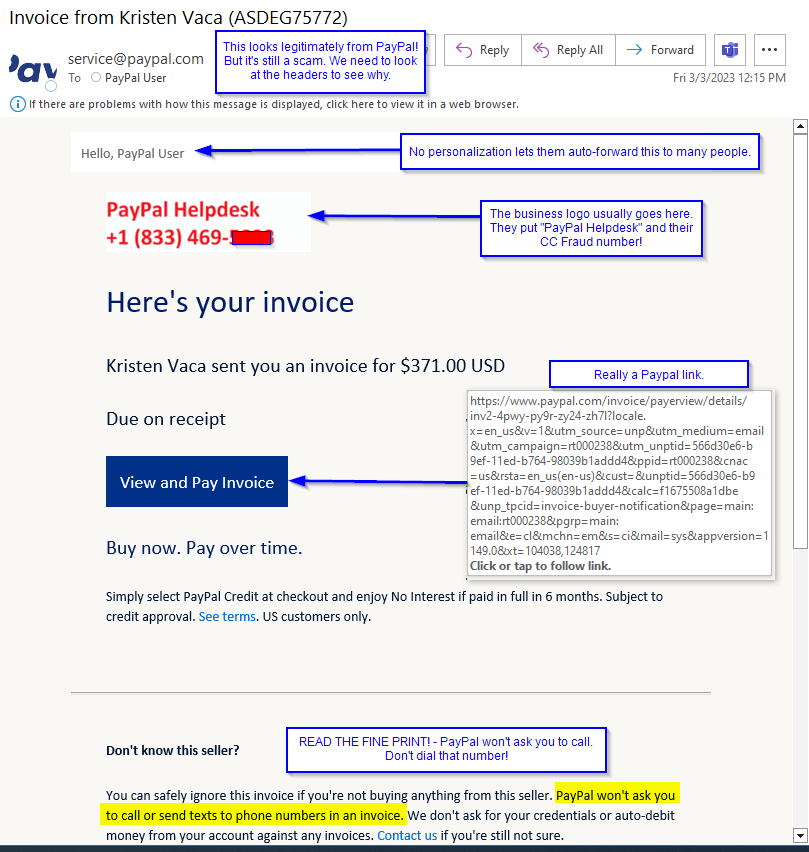
This actually is an email from PayPal. It’s just not originally addressed to you. There are still some things that you can look for to make this stand out.
- No name.
Notice that they sent this to “PayPal User”. For this trick, they can’t seed individual names into PayPal – PayPal would notice that this brand new account was sending many invoices, and they’d get suspicious.
As far as PayPal knows, the account holder only sent one invoice request.
- The image of a name and number.
The company logo here isn’t one. Instead, that image block has the words “PayPal Support” and a toll-free number. This bypasses any text filters that PayPal has. The actors also hope you will not scroll to the bottom where it says that PayPal will not ask you to call them.
To see why the cyber actors do it this way, and how I know it’s an auto-forward, we have to look at…
The Message Header
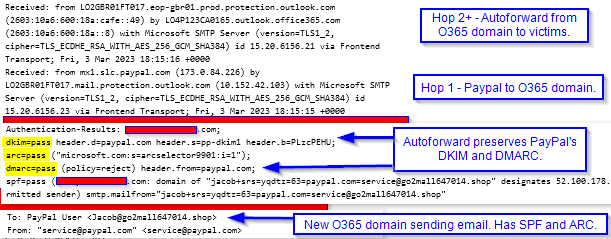
A header is a little weird, in that for some of it, you have to read from the bottom up, and for other parts you read from the top down.
In the first section above, that’s the “Received” list which reads upwards. Each mail server or filter that handles the email puts its stamp on it – much like the mail relays of old for physical mail. The first “received” shows that it cam FROM PayPal and TO an Office 365 domain. The next Received shows it passing from domain to domain. (Those with our company were cut off. I don’t mind showing bad guy addresses.)
The second section is added at the final destination (our email filter.) It’s the anti-spoof check, and WHY the cyber actors are doing this slingshot. What’s special about an auto-forward is that it preserves the original sender’s info. So when our filter runs the protocols, they ask both the original sender, PayPal and the new domain. The new domain clears SPF and ARC. PayPal checks the message hash (DKIM) and since the original email was not altered, they pass it. This also passes PayPal’s DMARC! Note how PayPal has a strict, flat-out rejection of any email it doesn’t verify.
The third section just shows how the original target was that address on the new domain, and for that, they use a from display name of “PayPal User”. Because again, they can’t well put “Bob” and expect every “Jane, Frank, Shelly, and Kris” to believe the invoice was intended for them too!
 Next On Stage: Off Phishing
You must be logged in to post a comment.