Setting up a FB group for auditions amd rehearsals.
Intro
New Play!
In early January, I was asked to join the poduction crew for The Players’ Theatre Company’s production of “La Cage Aux Folles” at the Owen Theatre in Conroe. This play was adapted for “The Birdcage”, which came out in 1996 and starred Robin Williams, Nathan Lane, Gene Hackman, Dianne Wiest, Hank Azaria, and more. This will be quite a departure for me, as it’s both a musical and I’ll be assistant-directing.
I have been backstage in musicals before,usually as propmaster, crew chief, or stage manager. My strategic talents lend to the Tetris puzzle that set pieces often are. Still, I haven’t been near the director’s chair since college, where I decided that making all the decisions isn’t for me.
As we prepped for auditions, we decided we wanted to follow a tactic used in the previous show, “Sweeney Todd”, and use a Facebook group not just for coordinating rehearsal notes, but to drum up interest and answer questions before auditions too. Most theatres / companies utilize the former; not many the latter.
The Concept
We wanted a public, sharable group that anyone can find and join, so they can find out more detail about the auditions, ask questions about the production or crew, and generally hype the event.
We also want to have some nominal security, as there are a lot of people who create acounts that aren’t fully authentic. These could range from “digital creators” who have monetized their streaming video and would post indiscriminately to promote their click-throughs, to bot accounts that could either scan for personally identifyable info (PII) or attempt to actively phish or send disinformation into the group.
After the auditions, we want to close the group, restricting it to the known accounts of cast and production crew. With the perimeter thus raised, we could turn off certain controls that watched for spammers as above.
Before Auditions
Group Type
We discovered that this was an important choice to make when you create the group. Facebook does not allow private groups to become public, so in order to have that initial chance to talk to perspective actors/dancers, we needed to start out making this a Public group.
Settings
While we wanted anyone to join the group, we didn’t want to leave ourselves vulnerable to bots. So we turned ON “participant approval” and turned OFF “anonymous posting.” This gave us an initial layer of security while we were open for anyone to join.

Rules
It’s important to be transparent about these settings, too. We created both a post with the intentions and placed it within the “group rules”. We still had a couple “digital creators” attempt to join and post, but this moderation prevented that.
After Auditions
Changing the type
After auditions, we could add the cast and change the type of the group. Another important safety tip: Facebook sets a three-day timer on this, where any other admin can abort the type change. This is understandable, given the irrevocable nature of the change. It does mean that you want to do this first, before any other changes. I don’t know that trying to game the timing of this is important; we didn’t have much of an impact waiting the time after we had selected our cast.
Settings changes
“Changing the type” also appears within the group’s news feed, so everyone in the group knows and can see when the group’s features will shift.
After the change processes, you can go in and update the settings – that initial participant test is no longer needed, as you’re now directly adding known contacts. Remove all folks who were not cast at this time too, and adjust visibility as desired.
Organizing Posts
Only after making the apove changes can you post more sensitive information. In our case, this would be rehearsal location details, choreography videos, sources for dancers’ footwear, and the like.
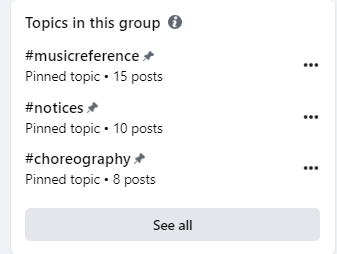
As you might expect, having a large mix of media in the posts can make the feed be quickly jumbled. Facebook’s elevated the tagging feature of other social media into “topics” and builds a pinned table of contents using them. One particular tag I found helpful was to put all the public-era posts into a #public or #preaudition tag, so they can be sorted out from the others.
 Next On Stage: Off Phishing
You must be logged in to post a comment.