
Anatomy of a Phishing Email IV
“Thank you for your cooperation.” Black Widow, “Black Widow”, 2021.

I’m jobhunting. After my previous employer’s severance payment completed, I applied to my state’s unemployment insurance site. Within two weeks, I received my first scam from a cyber actor pretending to be an employer.
They attacked using both text and email, but in the moment, I had only noticed the text. I successfully maneuvered them into giving me enough information to identify them as a scam, which I’ll dissect here for you all.
The Bait
Job hunting can be a mess. Even when you’re organized and keeping track of all the companies and positions you’re applying to, you don’t necessarily know who the recruiting agencies you’ve engaged are reaching out to.
Cyber actors take advantage of this to send you what appears to be a lifeline – an interview offer. They’re counting on you, the job-seeker, to be desperate and to chalk up any inconsistencies to being a referral from a third party.
The Hook
In today’s attempt, the cyber actors appear to have infiltrated Texas’s WorkInTexas.com site as employers, to be able to view job seeker contact data. In ATT&CK, this is Reconnaissance > Gather Victim Identity Information through Searching Closed Sources.
They acquired a pair of Gmail accounts and the format of a mobile phone number. For the Gmail accounts, they could have created them or have compromised these personal accounts from other people.
The phone number might be the actual number used, but likely is just a spoofed caller ID.
The Reel
The cyber actors’ initial goal is to secure a Teams call with the job seeker, with the job seeker initiating the call and inviting the compromised account.
Remember the folklore about vampires, that they cannot enter a home without an invitation? A lot of software and services are patterned the same way. Initially, the outside party cannot do anything unless you invite them in. Thus, having you invite the compromised account is important.
At this point, we speculate. During the Teams call, the interviewer may request to send the job seeker a file or “request control” of the call for some reason, like to “invite another manager”. Once you have given them control, they can install malware on your computer.
They could also want to impersonate you for applying to companies themselves as a remote worker. So they could have a set of questions they want to get your answers on and record you answering them.
A third possibility is straight fraud. They might style themselves as a job broker and ask you for your bank account ACH information, “in order to secure a deposit” or as part of a “background check.” Their true purpose however is to drain that bank account.
UPDATE: A post to the Better Business Bureau (link in “The Catch”) gave some details as the person reporting accepted a Skype interview. The report said it seemed normal “until the end when they give you a long list of Microsoft and other programs that you will need. The interviewer proceeds to tell you that they will be sending you a check thru the mail to that you will need to deposit in your bank account to purchase things you will need for a home office set up to include the office programs.”
The Catch
As soon as I had the text info and verified that “BIO HEALTH PHARMACEUTICALS” was not in Work In Texas’s list of employers offering jobs, I reported the text to Texas Workforce’s fraud reporting tool. I included screen shots of the text exchange and the partial employer listing.
The day after I also ran a report to FBI’s IC3 site – the Internet Crime Complaint Center. I found the email here, so I was able to provide it along with three names, two Gmail addresses, and the phone number.
Work In Texas also offers a full slate of possible scams to protect yourself against.
UPDATE: The BBB also has a report of this event, so I added my experience to it.
Anatomy of the Attack
The Email
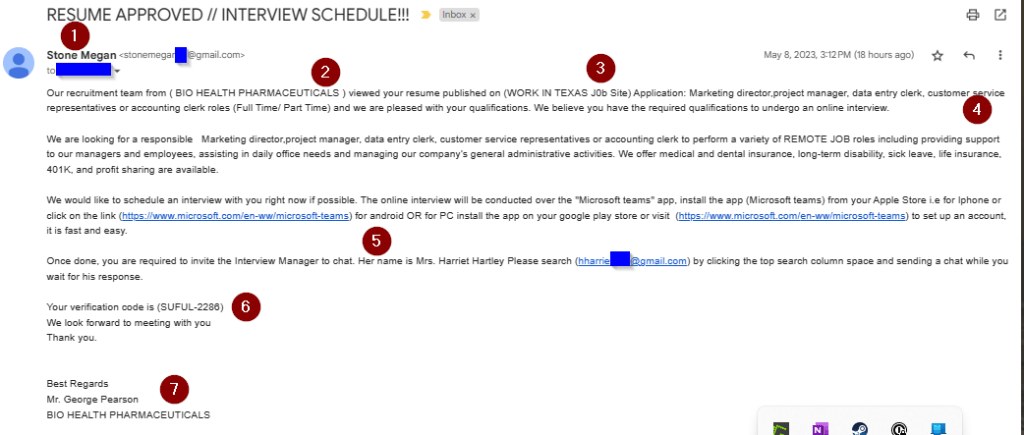
- They used Gmail addresses instead of company addresses.
- The sender’s name in the email was “Stone Megan”, and the text doubled down as “Mr. Stone Megan”.
- This name doesn’t come up in regular internet searches nor specific LinkedIn searches. (“Megan Stone”, however, has several web presences.)
- The company, “Bio Health Pharmaceuticals” has an Australian presence, but no Texas presence that I could find in my initial search.
- More importantly, it does not come up on WorkInTexas’s list of employers seeking talent.
- Within the email, they listed “published on (WORK IN TEXAS J0b Site) Application”.
- The use of parentheses, the use of ‘zero’ in ‘job,’ and calling the site an “application” all pointed to a bad form letter.
- Within the SMS text, only the trailing parenthesis showed, which further triggered “bad grammar”.
- If I wasn’t already sure this was a form letter, they listed me as five different possible roles at different management tiers, all at once.
- They wanted to enforce the use of Teams as the contact point.
- The links they offered were legitimate, but then they wanted me the job hunter to initiate the connection and invite the interviewer – another Gmail address.
- They supply a meaningless verification code, not the “Job order number” that exists within the WorkInTexas.com site.
- The signature had several red flags.
- The person signing the email was not “Stone Megan” but a third party.
- They had no contact info within the signature for Bio Health Pharmaceuticals – no address, number, website, email.
The SMS Text
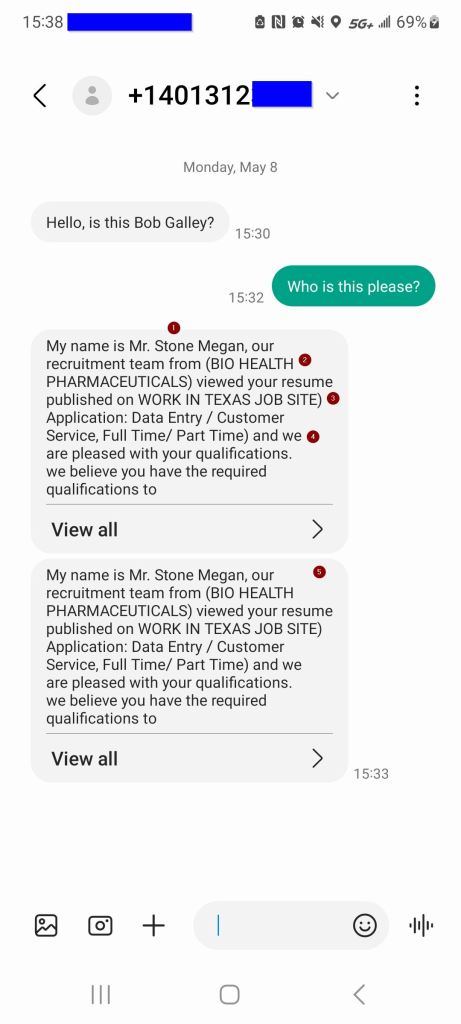
I hadn’t even noticed the email, though, as this text had come in while I was in a text conversation with someone else. Here are the red flags I saw.
- Not numbered – the phone number itself.
- It is not one of my contacts.
- It has no “apparent” caller id.
- 401 area code is Maryland.
- I looked up the area code via a simple “401 area code” search.
- I don’t know anyone who currently is in Maryland, nor who told me they spent time there.
- Later coupled with the company name, it seems strange for a Maryland mobile to text regarding an Australian company.
- They don’t know who I am. They asked to confirm.
- The trick here is try not to give out any more information than what they already know.
- I did not explicitly confirm, but instead asked them for their information.
- “Mr. Stone Megan”.
- Look up names. Use both a generic web search and anything specific to the context.
- This is a job context, so I searched on LinkedIn.
- In both cases, I received a lot of “Megan Stone”, but no “Stone Megan.” This makes sense, as “Stone Megan” just sounds off.
- In hindsight, we see that the Gmail account is also “stonemegan” and numbers.
- We can infer that this belonged to a “Megan Stone”, but the cyber actors swapped the order to try to make a masculine-sounding name.
- “(BIO HEALTH PHARMACEUTICALS)”
- Look up companies. Dun & Bradstreet has a profile for this company name, also in all caps, which is a publicly-traded company in New South Wales, Australia.
- Look for oddities. In this case, the company name in ALL CAPS and the parentheses around it both show a departure from the rest of the sentence.
- The change in caps style also hints that this was probably filled into the spot, which hints that this is a form letter or mad lib.
- “published on WORK IN TEXAS JOB SITE) Application”
- This tells me the source of the leak, but also gives another place to look up the employer name.
- Work In Texas only came up with 4 employers with current job openings where the employer started with “B”. “Bio” anything was not one of them.
- Here’s another parenthesis, and only half of the pair. Not just poor grammar, but the start of a pattern that we’ll see again soon.
- The word “Application” is also weird. It’s outside the parenthesis, though, so I think it’s part of the form letter.
- “Data Entry / Customer Service, Full Time / Part Time) and we”
- Third data point with a parenthesis.
- The grammar doesn’t flow here. This was dropped into a field on the form letter.
- The texter double-tapped.
- Now, I was in the middle of nowhere, in the passenger seat, and we were dropping between cell towers like flies.
- Still, these came in right on top of one another. There was no apology for it either.
 Next On Stage: Off Phishing
You must be logged in to post a comment.