

Anatomy of a Phishing Attack VII
For some reason I can’t fathom, someone out there thinks I use Harbor Freight Tools. I may have been in a store once, 20 years ago, in their safety clothing section for a costume piece for a show. Yet, years later, I continue to receive emails from cyber actors trying to hook me with “here’s this free thing!”
Now, we all like free stuff. But we have to be cautious, as these are really ways for the bad guys to get your personal information and potentially install malware on your computer. Today’s blog includes not one, not two, but three different fake emails as examples!
The Bait
“Free stuff” is a powerful draw. Whether it’s money, a vacation trip, or in this case, a power washer, people like the idea of getting something for nothing. Cyber actors use this to entice people to click their links and follow their directions.
The Hook
The hook itself is always to get you to either click on the link or open the attached file. Like most other phishing email, it can’t hurt you until you let it in, much like the legend of the Trojan horse… or rabbit. Cyber actors will play tricks to make this easier for you to do. For instance, in the third email example, the entire email is a single image tied to a hyperlink. Click anywhere in the image – the white space, the text, the “button”, and you go to the same place.
The Reel
Once you’ve clicked the link, you’ll be whisked off to their controlled webpage, likely through a couple redirections to thwart your email and web filters, like the second example’s path through LinkedIn.
Once there, the site will either attempt to get you to log in or attempt to install malware. Logging in might be targeted, like to “your account” for the company they teased in the email, or more likely, to your email account – and they’ll have options for Office 365, iOS, Gmail, Yahoo, etc. They’ll then spend time reading your past email for things like password links, invoices, and other ways to either get into a work environment or use an email against you or a contact.
The malware will be similar, first scanning your computer to see what you have access to, and if the cyber actors can use that information for financial gain. It could also have what’s called a keylogger for recording passwords as you type them (along with usernames and website URLs), and a way to potentially deliver encrypting software – the dreaded ransomware that’s in the news.
The Catch
For a lot of these attacks, the best thing to do is to report and block them locally. Each of these examples come from hastily created web domains that are likely in existence only long enough to send this batch of emails. Two are Microsoft SharePoint environments with the “onmicrosoft.com” domain. This abuse of legitimate cloud services makes it difficult for work IT to block these subdomains without also blocking the legitimate SharePoint users.
It’s also difficult for your work IT to block these based on context, unless your company adopts a policy of blocking any “no text, picture only” emails. Legitimate companies also present their ads as either one image or a series of small images (for faster downloading). Also, how often are you or someone at work taking a photo of a work in progress or a receipt and sending it to yourself or a co-worker?
Anatomy of the Attack
The real Harbor Freight website
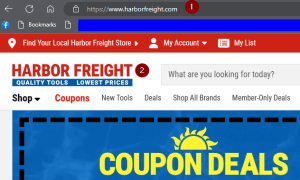
We should take a moment and look at the real Harbor Freight website, as this is who the ctyber actors are pretending to be. It’s important to note the website here, as this will also be the basis of the email address should you legitimately get email from them!
The website is ” www . harborfreight . com”. That means real email from them would look like ” somebody @ harborfreight . com “.
Sample Email #1
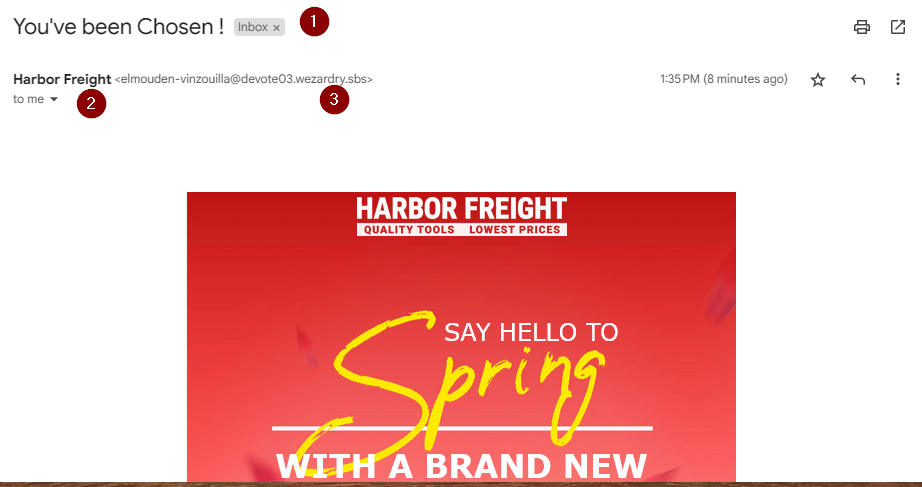
Our first email attempt is a free tool kit! The following clues are for the first two photos.

- The subject is their first chance to draw you in. “You’ve been Chosen!” makes you feel special.
- If your phone, browser, email program doesn’t show you all the email addresses, there’s usually a way to see them. In Gmail, it’s this little down arrow next to “to me.”
- I can see that the address is NOT Harbor Freight’s. That’s the big clue as to how this is fake. The domain “wezardry . sbs” was created 5/15/2023.
- This is an example where there is no text – just one large image surrounded by a hyperlink. Note how even so far to the left of that image, the icon is the “pointy finger” associated with clicking a link, not the generic arow pointer.
- When you hover over a link (or press-and-hold on a phone), the link address or URL will show. On a computer, this link is often at the bottom left. This link is routing first through “bit.ly”, a popular redirection site.
- Here’s another clue – nobody will really enroll you in their loyalty program without asking you.
Sample #1 – Checking the short URL
One thing you can do is right-click the link, then “copy link” to your clipboard.
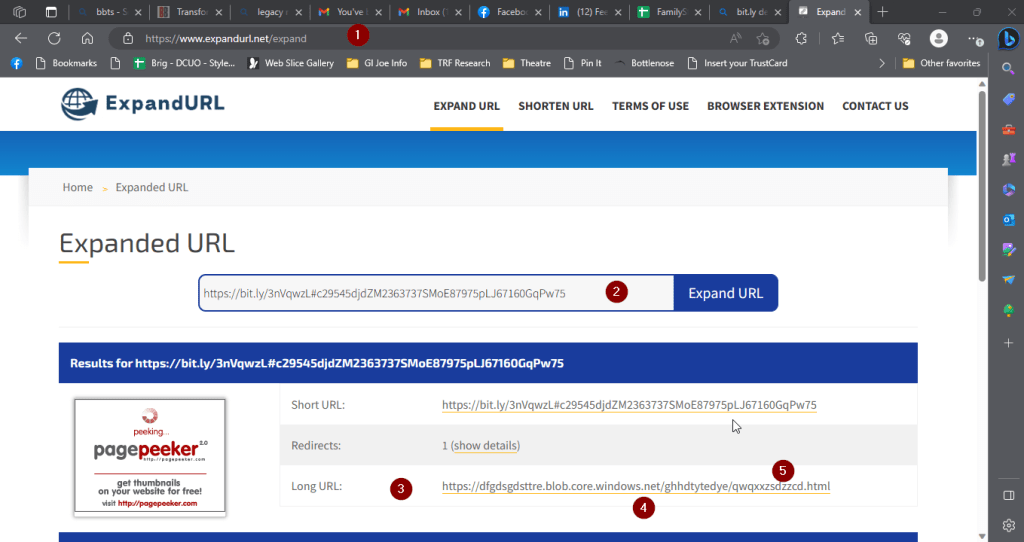
- Then you can go to a page like this one to find out where that link actually goes. Multiple legitimate URL expanders are out on the internet.
- CTRL-V (paste) the questionable URL into the prompt.
- The tool will show you the end destination. Some also count how many different URLs they go through on the way.
- “blob . core . Windows . Net” sounds legit, but it’s really “Azure Blob Storage”, basically cloud storage that anyone can purchase and store anything on.
- All these random letters in the file name hint that this was saved here by a program using a random character generator.
Sample Email #2
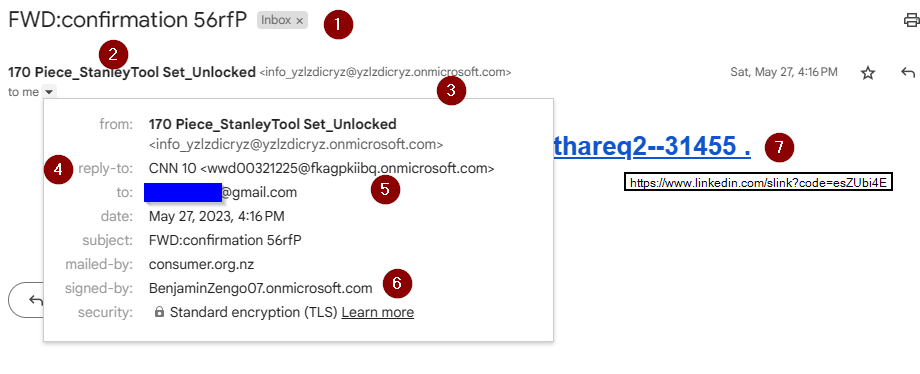
- I imagine they want this to look like an official invoice, thus they used a confirmation number that looks like a code.
- Here, the “display name” of the sending email address offers the “free stuff” bait – another free tool kit.
- 10 random characters hints at a program that created the SharePoint “onmicrosoft.com” domain.
- This has a reply-to address. These are typically more stable domains that the bad guys control.
- Their reply-to address points to a second randomly-named SharePoint domain!
- Interesting that a third domain shows up. Your work IT would then block all three of these domains.
- The image failed to load, but this was the link that it offered. See the phrase “slink?” in the middle? That’s LinkedIn’s “redirection” command. Someone assigned a URL to the slink code “esZUbi4E”.
When I tested it, LinkedIn had already removed the slink, which now directs simply to LinkedIn’s home page.
Sample #2 – Header
Your email client will have a way to see the “headers” – the information that email programs use to record the sending of the email, email “metadata” like the sender, subject, datestamp, etc, and any checks that email filters ran on the email along the way.
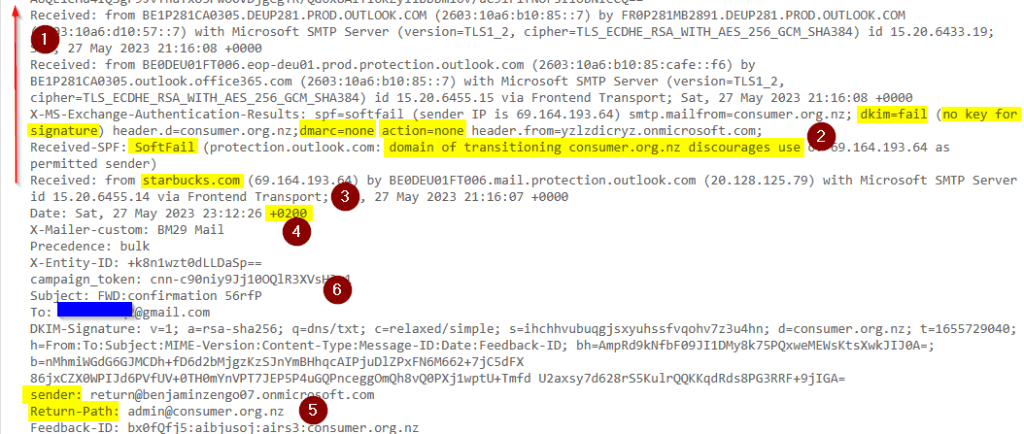
- Headers are special. You can’t edit the middle of them. Each email server along the way will add its “received” info at the beginning of the header, so to read them you scan to the last “received” then go up.
- These highlighted items are the initial anti-spoof checks that Outlook.com made when it first received the email. This one has several “soft fails”. This would be bad if they were trying to claim the email came from “Harborfreight.com”, but the random SharePoint domain has a DMARC instruction of “Do nothing if fail”, which essentially allows spoofing.
- The very first “received” is from a Starbucks! Possibly in New Zealand, based on the “consumer.org.nz” header it’s pretending to be.
- The header date can’t be edited, so its time zone is a clue to the location of the device that first sent the email. “GMT +2” includes Egypt, Lebanon, Israel, and Russia’s westernmost time zone.
- This is how the reply-to address looks in a header. While it says New Zealand, the time zone above implies that the cyber actor in GMT +2 has the ability to read email in that New Zealand domain.
- This area of the header is the subject and to items that also show on the email itself.
Sample Email #3
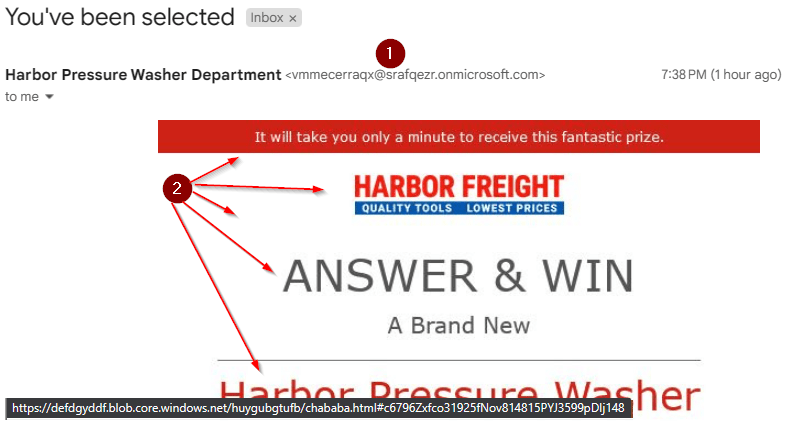
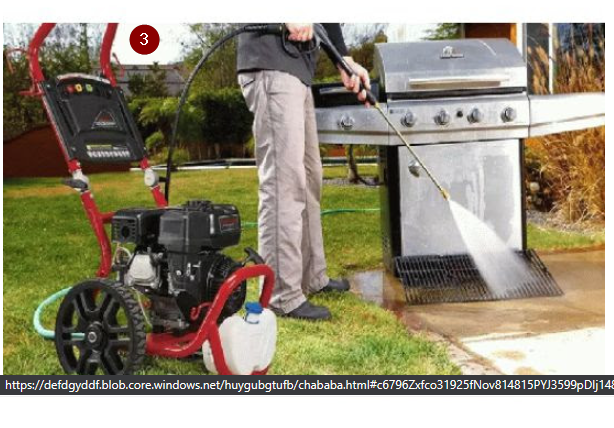
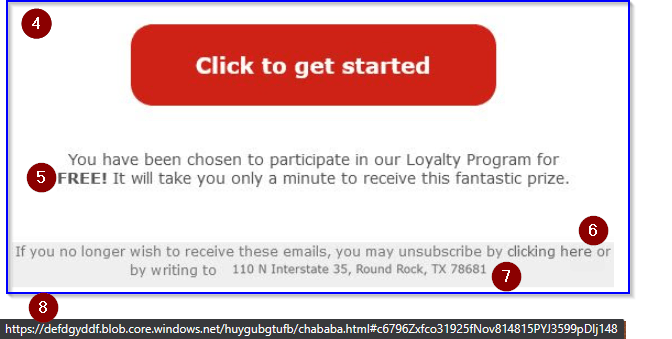
- It’s another SharePoint site with a randomly-generated name!
- It’s another image as email. Hovering anywhere the arrow points results in the same preview address!
- Here’s the bait – a pressure washer this time!
- They put a big button in the email, but it is a way you can check. An email that only has a link around the button will make the mouse pointer change shape when you wave on or away from the button.
- It’s that free loyalty program again! Interesting how they don’t remember that they already signed me up for it, right?
- “clicking here” to unsubscribe is another ruse. It’s still all in the same image, and all still pointed to their same page on Azure Blob Storage.
- Here’s a visual clue. No marketing department would let a company flier go out where the text suddenly shifts up and changes font. This physical address was edited into the image.
- Again, the blob core windows net address. If this were a real email, then you would expect it also to point to somewhere on Harbor Freight’s website.
 Next On Stage: Off Phishing
You must be logged in to post a comment.