Anatomy of a Phishing Attack 02.1
How many of us have received an email about a subscription renewal and immediately moved it to our “bills” folder? Or forgotten exactly what services came with our new device or phone or internet service? This is the gap that cyber actors hope to exploit when they send fake renewal emails and ads.
The two new examples are from different actors with different goals in mind. One is a credit card fraud we’ve previously explored (thus the 2.1 numbering) and the other uses a web ad to try to trick you into clicking.
In these examples, the cyber actor sending the Norton renewal wants your credit card information. The cyber actor who set up the fake McAfee renewal ad wants you to click through to a certain site and potentially download an “update” that really is their command and controlagent to connect to your device.
Example 1: Norton Email
The Email
Here is the email. It has several suspicious items.
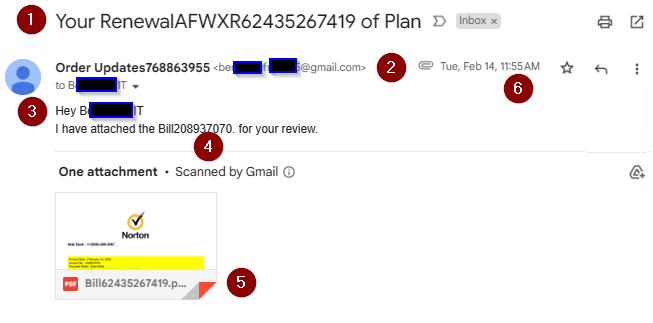
- The subject line is generic. Which plan?
- The email name “Order Updates” doesn’t match the compromised Gmail account address that sent the email.
- Also, they’ve decided that stringing a lot of numbers together makes this look authentic.
- They addressed me by the alias part of my email address. This shows a lack of research – all they KNOW is my email address.
This clue is also great for work domain names that don’t quite match work brand names. If they call you by your domain name, they don’t really know you. - More random munbers. Really, if they were consistent (subject, email name, email text), they’d have a better chance.
- The PDF has YET ANOTHER number! It is however, a PDF. That means no auto-launch macros so we can carefully look at it.
- The email was timed to reach me during lunch. This was planned. I’m likely to see this on my phone instead of my PC, where smaller text and the extra hoops to reveal email addresses work in the cyber actor’s favor. I’m eating, which makes this more of a “react” than thik situation.
The PDF
Looking at the PDF gives us the cyber actor’s goal (CC fraud) and MO (call them to run their confidence scam). The email is broken into two images to talk about the clues in each section.
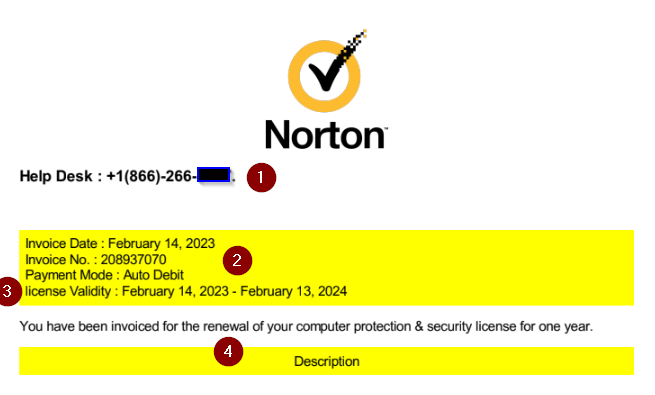
- The toll free number they’ve set up to run their scam is at the very top. Reporting this to the FTC or IC3 will aid in getting it shut down so others aren’t victimized.
- The invoice number is another place to check for consistency. This matches the email text. Too bad they used a different number for the PDF’s file name.
- “license” is in lower case. A legitimate business would run any form through multiple approvals before they are sent out. Any spelling or grammar error is a clue to suspicious content!
- This is a lie. They’re banking on you forgetting that you never had this plan to begin with.
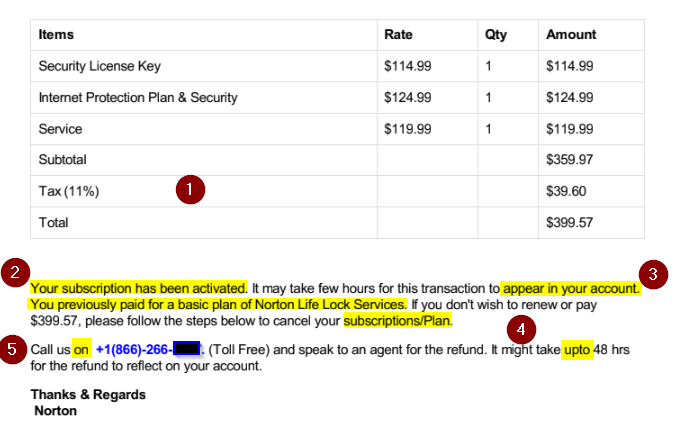
Clues in the bottom half of the PDF are:
- Tax, for what state? In the US, folks have to show which state sales tax they have to use.
- These two highlighted areas on the left are their lies.
- Appear in WHICH account? No mention of “card ending in NNNN” or other indicator, because they’ll want you to tell them the card number when you call them to cancel.
- These two highlights are missing spaces and an errant capital letter. Every grammar error increases the chance this is fake.
- In the US, we say “Call us AT this number”, not “on”. This shows the cyber actor is translating into English from their native language.
Example 2: McAfee Ad
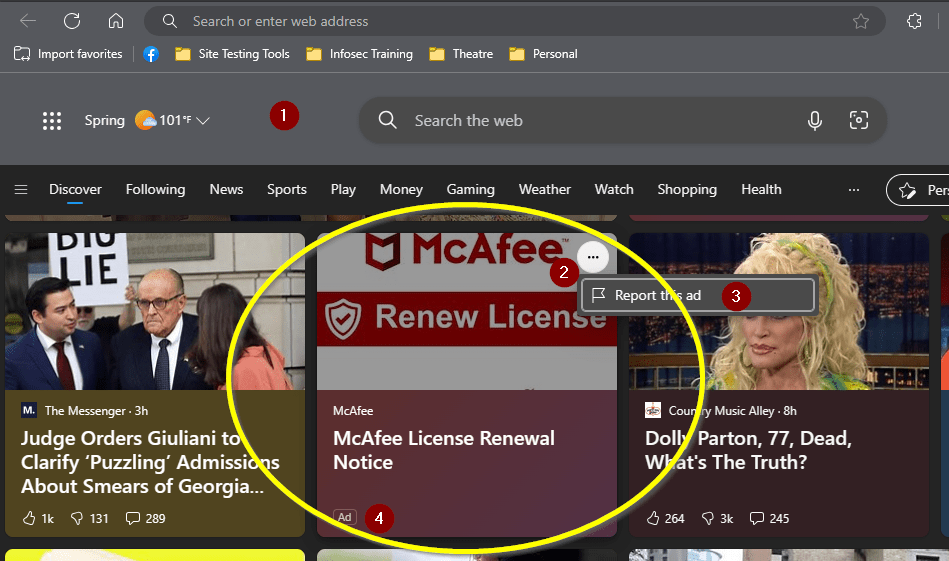
The Ad
This example shows that cyber actors can sneak their links into almost any ad service!
- The page is Microsoft Start, Edge’s default landing page.
- Each entry on Start has a menu button.
- Within this is an option to “Report this ad”. It will ask for a reason why, which “Misleading ad or scam” is the best fit answer.
- Unlike the news articles, ads are marked as such by Edge and do not have the social media options to like/dislike or comment.
The First Landing Page
Clicking on links is dangerous. Researchers can create a virtual machine template and open the link within that “virtual sandbox”. That way, if the page tries to download software, the researcher can delete the entire virtual machine and launch a brand-new VM as if it never happened. Folks can also protect themselves by creating a limited user for their everyday browsing. Limited users don’t have permission to install software, thus limiting what cyber actors can pre-plan.
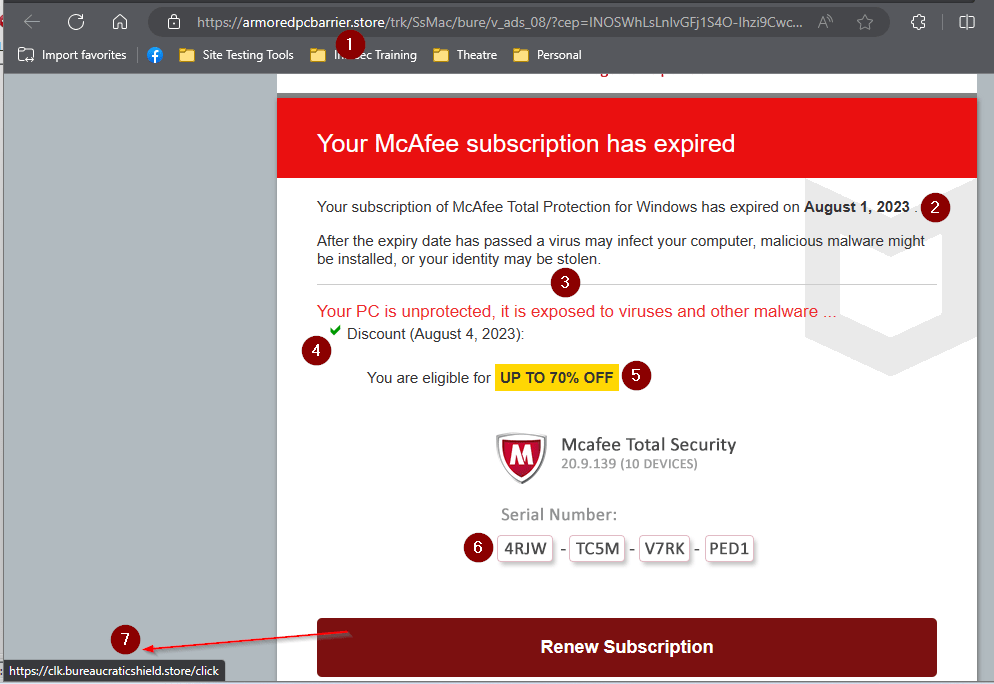
- The URL is the first clue. ICANN’s WHOIS tool tells me it was created March 20, 2023.
- This is probably a “current month” function. The goal here is to set an artificial deadline to urge you to react instead of think.
- More scare tactics.
- Another function, likely a “Today()” that again is to get you reacting to an imaginary deadline.
- And the bait. Who wouldn’t want to feel like they’re getting an incredible deal?
- Thanks to X-Box and game redemption codes, string any 16 random letters together in four groups of 4, and folks will think it’s a real code.
- Hover over the link to see where it goes. If it goes somewhere unexpected, don’t click the link! This goes to another “.store” domain. “Bureaucratic shield” sounds more like random words tossed together. (It was registered in October 2022.) At least “Armored PC barrier” sounded like protection for your laptop!


You must be logged in to post a comment.